![]()
Google Docs
Work together better
Create or upload
Create awesome documents, spreadsheets and presentations with Google Docs. Or, you can upload your existing work to view, share and edit online.
Share securely
Your docs are stored on the web, so sharing them can be as easy as sending a link. You can make your documents as public or as private as you like and control who can view, comment on and edit each document at any time.
Work together
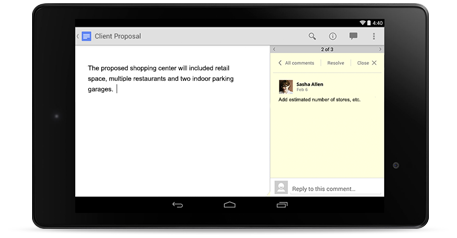
Google Docs is designed for teams. Multiple people can edit a document at the same time and integrated chat and commenting make it easy to work together.
Word processing
Create rich documents with images, tables, equations, drawings, links and more. Gather input and manage feedback with social commenting.
Spreadsheets
Keep and share lists, track projects, analyze data and track results with our powerful spreadsheet editor. Use tools like advanced formulas, embedded charts, filters and pivot tables to get new perspectives on your data.
Presentations
Create beautiful slides with our presentation editor, which supports things like embedded videos, animations and dynamic slide transitions. Publish your presentations on the web so anyone can view them, or share them privately.
Learn more
Stop worrying about what folder you put which doc in and find exactly what you’re looking for with fast search powered by Google. Search over content you’ve created and docs that have been shared with you.
With Google Docs, it’s easy to import your existing work and convert it from most common text, spreadsheet and presentation formats so you can edit and share. Optical character recognition (“OCR”) even lets you import editable text from PDFs and images.
If you need to, you can easily download any of your docs to the most common text, spreadsheet, presentation and drawing formats or export them to PDFs on your hard drive.
You can print any of your docs right from your web browser or even from your mobile phone or tablet using Google Cloud Print.
Do more than just view your docs on your mobile. Make edits and share with others in real time from your Android device or any mobile web browser.
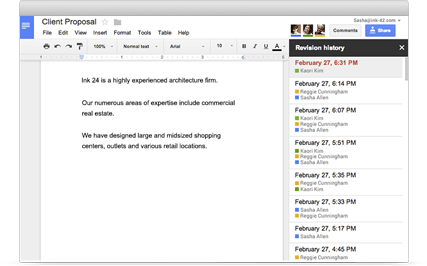
Keep track of all the changes that you and your team have made to each doc. Detailed revision history lets you look back at each doc after each set of edits and you can always revert to an previous version if you like.
Build a form with the straightforward forms editor and collect data from colleagues or customers. All the responses are recorded in a spreadsheet so it’s easy to analyze and share.
Create and work together on visuals with the drawings editor and then use the web clipboard to insert them into existing documents or presentations.
Giving your documents consistent formatting is easy with custom styles, which let you define the default styles for things like titles, subtitles, body text and more.
Get a jump start on your work by using a pre-built template. Or, create customized templates with your company’s colors and logos and share them privately in your organization.
Google Spreadsheets include tons of built in functions for all the standard finance, statistics, mathematical and database needs you’d expect, as well as some unique functions that help you pull data directly from the web.
Google Spreadsheets makes it easy to create standard charts like line graphs, scatter plots, pie charts, bar charts and more. You can also capture more data in unique dynamic chart types like timeline charts, motion charts and more.
Google Spreadsheets includes powerful data analysis tools such as pivot tables, filters, data validation and solver.
Google Docs is designed for security and reliability with features like encrypted connections to Google’s servers, real-time file save, simultaneous replicated storage for your documents, built-in disaster recovery and fine-grained sharing controls that let you share your work with the right people.